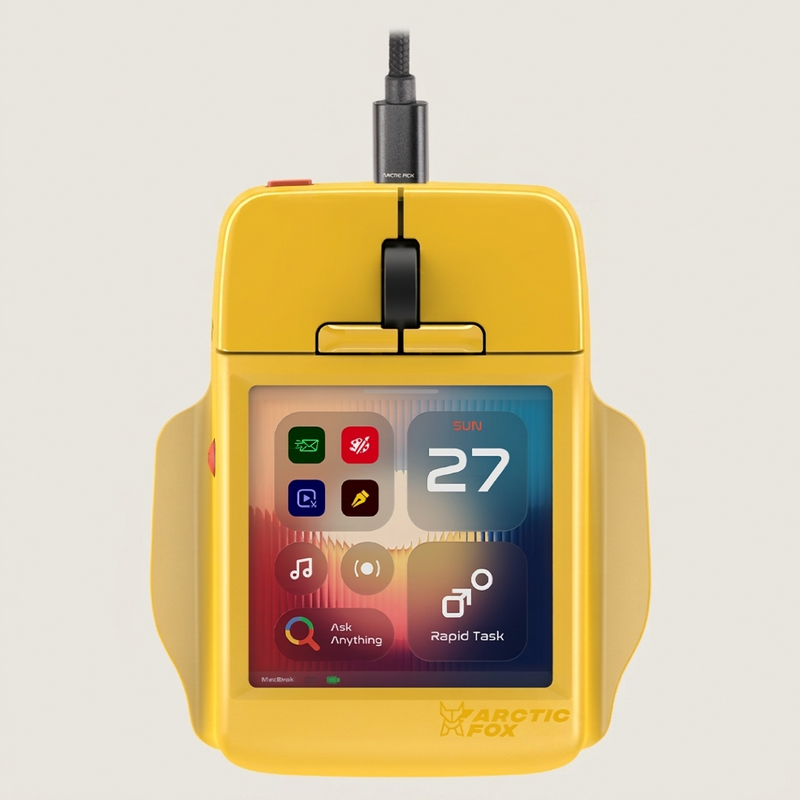
A mouse with a touchscreen sounds a bit unnecessary. Then you see what Arctic Fox has put on it and suddenly the idea gets interesting.
Super Mouse has a 3.1 inch touchscreen, app shortcuts, voice typing and a keyboard. Yes, a keyboard on a mouse. The little thing that normally moves your pointer seems to want a bigger role on the desk.
A small screen with plenty to do
The screen can show controls for the app you are using. Switch from office work to video editing and your shortcuts can change too. The idea is simple: keep the commands you use often within reach.
Arctic Fox’s Flow desktop app lets you arrange those controls and create your own shortcuts. Physical Hyper Keys can trigger a single command or a whole sequence of actions. Opening your usual set of apps with one press? That could be handy.
Super Mouse works with Windows and macOS. Its touchscreen has a resolution of 720 × 720 pixels, giving all those little buttons a fair amount of space.
And then the mouse starts typing
You can swipe across an onscreen keyboard, much like typing on a phone. There is voice typing as well. Arctic Fox says speech is processed locally on your computer.
Writing a whole document on a mouse might be taking things too far. For a quick reply or a few words, though, you can see why somebody would try it.
The screen also doubles as a trackpad for scrolling, swiping and zooming. Motion controls add another trick: tilting or twisting the mouse can send arrow key inputs.
So it is a mouse, a little control panel and a trackpad. Quite a busy job description.
But will it feel good to use?
Here comes the less flashy detail. Super Mouse connects through a USB cable. It also has a broad, unusual shape, so comfort will matter just as much as the touchscreen.
A familiar keyboard shortcut is already quick. Looking down at another screen will only help if the controls save you some effort. We have not tried the mouse ourselves, so that part is still an open question.
Still, it is nice to see someone trying something different with a gadget we use every day. A few useful shortcuts could make this small screen worth the space. Now the mouse just has to remember that being comfortable is part of the job too.